When your brand is impersonated in phishing emails that are currently circulating, it is important that you communicate with your customers properly.
Addressing that hackers are using your name to send phishing attempts helps to protect your customers, and at the same time signals that you take these incidents very serious.
This article is for you if you need to address your customers but don’t really know what a phishing warning email is supposed to contain. Either that, or you simply don’t have the time or don’t want to write the entire email yourself from scratch.
Disclaimer: These templates are editorial guidance, not legal advice. Before you send any communications based on these templates, confirm the wording you will use with your legal team. Also, legal requirements of breach notification vary significantly per country, industry, the nature of the incident.
Template: Active Brand Impersonation Warning
This is arguably the one you will use most often, when you catch wind that your brand is being used to dupe and trick your customer base.
Send this to your customers as soon as you know that phishing emails are being sent out. Every hour you delay this, is an hour your customers are exposed.
The template below makes sure you:
Protect customers from the ongoing scam
Communicate properly in the event of a crisis
Demonstrate that you care about the safety of your customers
Have proof that you warned customers early, which can help in possible future legal or support issues
Input Your Specific Details
Note: The [bold, bracketed text] are the parts where you are supposed to fill in the details relevant to your specific situation. The text in parentheses is guidance for writing the template and should be deleted before sending.
We are writing to let you know that scammers are currently impersonating [company name] in phishing messages targeting our customers.
What is happening (Describe the impersonation message in 1-2 sentences. How are they reaching your customers? (email or text?) What are they asking recipients to do?)
How to recognize the fake message: Through the following signs you can identify the scam:
(Warning sign 1, for example, the message contains a shortened link that does not lead to a website with your company’s official domain.)
(Warning sign 2, for example, manufactured urgency, the fake message pushes for immediate action, or action within 24 hours.)
(Warning sign 3, for example, a request for sensitive information: the scammer asks for passwords, credentials, or payment details.)
What to do if you already engaged with the message If you clicked the link but didn’t enter any information, the risk is generally lower, but not zero. To be safe:
Change the password of your account, and other accounts you have that share the same password
Enable 2FA (leave this out if your website doesn’t support 2FA.)
Watch your accounts for any unusual activity in the upcoming weeks
If you notice anything suspicious, contact us immediately at (company phone number)
How to verify if communications are actually from us: Check the sender’s email address carefully, not just the display name. (@ozarc.io vs. @ozarcsupport.io? Give the actual domains your company uses to communicate via email.)
You can always contact us directly, to make sure the communications are from us and not from scammers. You can call our phone number or contact us through email. You will find our contact information at the end of this email.
What we’re doing about this scam We take these incidents and the safety of your identity, data, and finances very seriously. Our security team is actively working to terminate the associated websites and stream of fraudulent messages.
How you can contact us to give us a heads up or if you have concerns You can contact us by sending an email to [company email] or calling us: [company phone number]
These are the most important things you should keep in mind when writing a phishing warning email to customers:
It describes the attack specifically, was it credential harvesting, letting the customer download a malicious file, or transfer a large sum of money?
How did the attack reach your customers?
How customers can contact your brand the next time in the event of a possible scam
What signs they need to watch out for going forward if they want to protect themselves from phishing
What to Do When Customers Receive Phishing Emails
A single report by a customer about an ongoing phishing campaign is often the signal of a wider campaign. How you handle it matters beyond that one conversation.
Get the evidence, but don’t click anything yourself. Ask the customer to forward the text message or email. Make sure your security team can review it.
It must become clear if this is a new message you’ve already seen, or if it’s the first sign for a new campaign. Furthermore, thank the customer for reporting it. A quick and human reply encourages people to flag suspicious messages instead of just deleting them.
Why You Should Report These Phishing Campaigns
A few reasons why you should report phishing campaigns or messages that use your company name:
It builds a documented response you may need later: If you would need to prove that you ”did something about it”, a documented response to share proves that you took the proper steps.
It helps more than just your own customers: Blocklisting and industry reporting (like APWG) protect anyone who might receive the same message.
It protects your brand’s reputation, not just the immediate victims: A scam running under your name erodes trust in the real thing, even if you didn’t cause it and weren’t hacked yourself.
How to Report
Giving specific instructions for every country isn’t realistic since reporting bodies and dedicated channels for reporting vary wildly from one place to the next, and what’s accurate today may have changed by the time this gets read.
The most reliable way: Search [your country’s name] report phishing on Google.
Either that, or your country’snational CERT/CSIRT on Google.
You need to send an awareness email to your staff about phishing, and you don’t want to write it from scratch. Either that, or you simply don’t have the time for it.
You’ll find three ready-to-send templates below, plus examples for the most common threat scenarios. You can grab a template, drop in the details that match your situation, and send it within a few minutes. The bold bracketed text is the part you are supposed to change.
They’re written to actually get read: as short as possible and non-punitive. They’re focused on what makes staff pause before clicking, not on lecturing them about phishing.
Template 1: General Phishing Awareness Email to Employees
When to use: Use this to set a security standard across the whole team. For an introduction to phishing, an annual refresher, or any moment when everyone needs to be reminded what phishing looks like and how to respond.
Unlike targeted or specific alerts, general awareness emails like this one align everyone, regardless of technical skill, to the same defensive standard.
Subject: How to spot a phishing email, a quick guide for the team
Hi team,
Phishing is still the most common way attackers try to get into companies, and because of AI, the emails are getting harder to spot.
This is a short guide to help you recognize them and know exactly what to do, when you spot a suspicious or unsolicited email in your inbox.
What phishing looks like
Phishing is a message, usually an email, but sometimes an SMS, chat, or phone call, designed to trick you into sharing information, opening a file, or transferring money.
The sender pretends to be someone you trust: a colleague, a supplier, your bank, a delivery service, or a well-known company or government agency.
Three things to watch out for
Requests that feel off: a financial request from higher up, an unsolicited document being shared, somebody asking you to login to review something. There is a possibility these requests are not legitimate.
Pressure to act fast: “Reply within 24 hours.” “Before the end of day.” A senior colleague pushing you to transfer funds today for an ”acquisition we worked on silently.” If a message is pressuring you, that pressure itself is the warning sign.
Sender that looks almost right: You get an email from a colleague or one of our suppliers. The name in your inbox is familiar. But the actual email address, if you check it, has an extra letter or a domain that doesn’t make sense.
What to do if something looks suspicious:
Don’t click links, open attachments, or reply.
Don’t act on the request, even if it seems urgent.
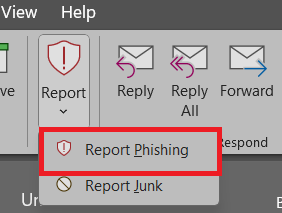
Report it: forward the message to [reporting/security team email] or use the Report Phishing button in [Outlook/Gmail/ETC].
When in doubt, ask. No one will ever be criticized for double-checking a message that looks off.
Thanks for helping to keep the team safe. Every reported message makes us harder to attack.
Sincerely, [Your name]
Template 2: Post-Incident Awareness Email
When to use: Use this after a real phishing attack has affected your organization.
Transparent and controlled communication like this email, sent to your workforce, helps transforming a real-world mistake into a moment you and your team can learn from.
It reinforces the conviction that leadership and workforce are serious about their defense, and are actively trying to improve it by talking about incidents, how they happened, and how to learn from them.
The [bold, braceketed text] gives the parts for you to fill in. The (sentences in parentheses) are guidance for the body of this email and should be deleted.
Subject: a phishing attack reached us this week, here’s what to watch out for
Hi team,
Earlier this week, a phishing email reached inboxes in our company. Here’s what happened, what the message looked like, and how you can keep your guard up going forward.
No email filter catches everything, and no training can make anyone immune to phishing. What protects us is thinking twice if we have the feeling something is off. Report it if you think it helps.
(Who were the attackers impersonating?)
[The attackers were impersonating a Bluehost employee][the CEO][a supplier][a government agency]
[They were trying to harvest credentials by sending our employees to a fake login page][They were trying to get our employees to transfer big sums of money][They were trying to get our employees to download a malicious file]
(What was the outcome as far as we know?)
[The phishing attempt was reported and blocked before anyone acted][One person clicked but no damage was done][It cost the company x amount, there was operational downtime, etc]
(What specific signs should employees watch out for?)
[Beware if the message is trying to isolate you, pressure you, or addresses you by your first name.][Watch out if the message has a shortened link, is supposedly from a higher-up, is asking you to perform a specific action, etc.]
If you happen to see something similar:
Don’t click links, open attachments or reply.
Don’t act on the request, even if it ”requires immediate attention.”
Report it; forward the message to [reporting/security email] or use the report phishing button in Outlook
Thanks for your attention and consideration, Sincerely, [your name]
Template 3: Monthly Awareness Reminder
When to use: This email keeps your phishing awareness present, preferably focused on a single warning sign that is relevant at this time. For example, that workers watch out for shortened links in emails, because those are prevalent at the moment.
A monthly reminder makes sure the phishing stays top-of-mind for employees, without triggering fatigue. A monthly reminder with one specific thing being covered, this email is valuable to send out to staff.
To be sure: you can input anything you want in place of the bold, bracketed texts. The text you see below are just examples.
Subject: Monthly phishing tip: [beware of authority signals][beware of shortened links][beware of isolation tactics]
Hi team,
For this month’s address we would like your attention for the following.
Be on your guard if you encounter emails with [authority signals][shortened links][isolation tactics].
What to watch out for [Authority signals: messages that lean on the sender’s role, for example: you get a message from the CEO, a director, or high ranking member of IT or HR, to make you act without thinking.]
[Shortened links: URLs that hide the actual destination, like bit.ly or tinyurl links. It could also be a button.]
[Isolation tactics: messages that ask you to handle something quietly, because they’ve been working on a deal in secret and ask for your compliance and discretion.]
Attackers use this because [Authority bias triggers automatic compliance, people don’t tend to question decisions or requests made by seniors or other people in authority.]
[you can’t see the real destination before clicking, and because of that might send you to somewhere malicious to extract credentials or data.]
[cutting you off from colleagues or preventing you from double checking increases the likelihood you fall for the scam.]
A simple rule you can use going forward: [If a request from someone senior feels urgent or unusual, you can verify it in a different way. For example, you can call the senior member in question or double check with a colleague to be sure. Never act, especially if you’re not confident about the interaction.]
[Legitimate business emails almost never use shortened links. If you see one, you can hover over links and buttons to see the domain they lead to, and you can check if it’s the same as the sender’s domain. If they don’t match up, definitely don’t click.]
[Asking somebody to keep it a secret or preventing them from double checking with their team is a red flag. There is almost always an ulterior motive behind it. This request for secrecy is a warning sign.]
If you see something like this:
Report it: forward the message to [reporting/security email] or use the Report Phishing button in [Outlook].
Don’t click links, open attachments, or reply.
Don’t act on the request, even if it seems urgent. I appreciate your time and attention.
Sincerely, [your name]
How to Adapt These Templates To Your Team
Again, the bold and bracketed text is what that paragraph should roughly contain. These 3 templates are meant for the most common scenarios you would want to send these templates in.
The Emails You Send Regarding Phishing Should Feel Non-punitive
Nobody wants to feel accused, especially after a recent succesful phishing attempt targeted at your organization. The framing should always be that it is for the safety of the entire company and that mistakes happen.
Make It Timely and Specific
”Watch out for phishing” is a tad general and doesn’t add much value. If you are more specific and refer to time, your message hits better. For example, in the next month, watch out for messages with shortened links.
Use Good Tone and Readability
The templates work as they are, after you have added the relevant and right info. But the tone you bring and how readable they are after you complete them is what determines if employees want to read them and apply the principles inside.
What to Send Alongside the Email
In addition to the email(s) you send to your team, you could send your colleagues over to our phishing examples. We prepared an article that shows 6 real-life phishing email examples that target employees.
In it, we included the emails with special annotations so they know and recognize exactly what phishing emails targeted at them may look like.
Include The Security Department’s Email
Reporting phishing is a big part of internal security for businesses. Reporting ensures that personnel with the right authorization can potentially review phishing attempts that reach your colleagues, in Microsoft Defender.
At the end of each email, encourage them to either report it within Outlook or the proper email software you use, or that they forward the message to the actual email address of your security team. Example: security@bluehost.com.
Common Mistakes That Kill Awareness Emails
These are common mistakes that kill awareness emails:
Sending too rarely: sending less frequent than once a month makes your staff forget
Sending too often: Sending weekly or even more frequent may potentially trigger a ”whatever” response in your employees
Including tips that are very obvious: ”Be careful with suspicious emails”
Walls of text without proper structure: make sure to properly space out your text and use headings where applicable, for different sections
Naming or shaming a person who fell for a phishing email
When Awareness Emails Aren’t Enough
Crafting and sending phishing awareness emails are a good start for your company if it isn’t already in place. Remaining top of mind and having a variety of phishing examples you can send to your colleagues can only help you improve your digital security.
They teach knowledge, but they don’t necessarily inspire or cultivate the confidence required when they are faced with actual phishing messages aimed at them.
The phishing emails that are the most effective are the ones that reach you on a friday afternoon at 4pm, and they read as a totally legitimate request. That is when phishing is it’s most dangerous and that’s what people fall for.
The Value of Phishing Simulations
Feel Free to Reach Out If You Have a Template Request
You can always send me a message at hello@ozarc.io. I will gladly take your request into consideration and add it to this article for reference, or send you the template personally.
Frequently Asked Questions
How often should we send phishing awareness emails?
Monthly is a cadence that works well. Quarterly is considered too frequent, the phishing threat won’t stay top of mind for long enough. Weekly will only train your staff in ignoring emails.
Should we discipline employees who fall for phishing?
No, the moment staff members feel criticized for making a mistake, you can rest assured that they won’t come forward the next time they perceive a potential threat. Reporting will increase if a blameless culture is created around phishing. High reporting rates are important for preventing attacks and succesful breaches.
Should we name the person who clicked in a phishing simulation?
No. Again, the same as above, it will prevent you building a blameless culture that encourages reporting and being forthcoming about digital threats. The correct move would be the send a post-incident email as in template 2, but without naming names.
What is a phishing test for employees, and should we run them?
A phishing test, also known as a phishing (awareness) simulation, is a fake phishing email sent out by the organization to see if anybody takes the bait. You can run them, but it can also undermine confidence your staff has in you.
How do we know if our phishing awareness emails are actually working?
The metric that matters the most is the reporting rate. What percentage of staff reports suspicious emails when they see or open them?
What should we do if employees keep falling for phishing tests?
Repeated failures indicate that the training approach isn’t working for that person. Try one-on-one coaching, phishing awareness training/simulation, or pairing them with a colleague that reports well or knows how to respond to threats and how to spot them. That colleague can help the other colleague along and help them spot and avoid phishing.
Do these templates work for small businesses?
Yes. The templates are applicable to all kinds of businesses. There are no limitations because of company size or industry. A lot of smaller businesses fare better with these kinds of tactics, since larger corporations may already depend on anti-phishing platforms, instead of internal communications like this, to strengthen digital security among staff members.
You help a family member being scammed by staying calm and non-judgmental, working with them to verify what’s really going on, and taking action to limit the damage; without accessing anything on your own.
Suspecting that a loved one is being scammed is a tough experience. On top of that, how to actually navigate this scenario is hard. Talking about it with them without triggering shame or denial seems like a tall order.
Is your family member aware that they are being scammed? Are they in denial? How do you know for sure they are being scammed? Are they contacted through email, sms, or are they having conversations over the phone?
The same checks we use throughout Ozarc for spotting phishing apply here too. But now it is aimed at protecting someone else instead of yourself.
Already certain something’s wrong: they told you directly, or someone else did? You can skip ahead to step 3 in this article. Still going on a feeling, with nothing concrete yet? Start with the signs below.
These steps offer you a sequence you can go through if a family member is being scammed:
Determine they are actually being scammed by observing the signs mentioned below
Approach them about it: are they open and forthcoming about it or do they refuse to believe it?
Verify the nature of the attack and assessing the damage
Recover losses if necessary
1. Look For Signs a Family Member is Being Scammed
I’m going to be upfront: without joint access to their accounts you’ll mostly have to rely on their behaviour, what they tell you in passing, and what a third party like a bank, another family member, or a friend tells you.
t’s perfectly normal for family members not to share what they do online, what they spend money on, or who they talk to. If a scammer did target them, that’s even more reason to hide it.
Alternatively, the scammer may have purposely isolated them by telling them to keep it quiet.
With that said, these are signs you can and should look out for if you feel someone is scamming your family member; if you don’t have access to their accounts or devices.
If you do have access to their accounts or devices, a few specific things are worth checking, covered at the end of the following section.
What They Tell You Directly
You can infer a lot by speaking with your family member directly:
They mention a new friend, contact, or romance
Sudden investment or business opportunity
Selected for something
Payment requests
Do they mention a new friend, contact or romance? Are they having travel plans all of a sudden? Especially if they have never met this person in real life, that could be a sign someone is scamming them.
Are they talking about a sudden investment? Scammers often use too-good-to-be-true offers to lure victims in moving sums of money. If they mention that they are considering an investment, a good offer, or a business opportunity, it could indicate a scammer is targeting them.
Furthermore, being ”selected for something” or being contacted about a problem that needs fixing right away are potential signs.
Finally, if they casually mention paying, or that someone asked them to pay with gift cards, wire transfers, or cryptocurrency, that could be a big giveaway that something is off. Legitimate transactions essentially never use those methods.
Behavioral and Emotional Changes to Watch For
Behavioural and emotional cues that a family member is being scammed could be:
Secrecy
Defensiveness
Isolation, pulling away from loved ones
Spending noticeably more time on their phone or laptop
Stressed
Secrecy, examples of this type of behavior are subtly hiding their phone screen when you walk in, logging out of accounts quickly, or closing browser tabs.
Defensiveness, for example, when you gently ask probing questions about the ”opportunity”, new contact, or request made by an external party. Your family member may be getting irritated, silent or tense the moment you ask.
Moreover, if a family member is being scammed they may be consciously isolating themselves. This is because they know you might question the validity of the interaction in question, and they’re trying to avoid that.
When they spend noticeably more time on their phone or laptop than usual, it could indicate that something enticing (like the new contact or business opportunity) has crossed their path. If the amount of time they spend on it is out of the ordinary, it could indicate that your family member is being scammed.
When a family member is being scammed they could be stressed about it but aren’t telling you. Stress from an active scam can’t be released by telling you because they intend to keep the interaction private.
Put The Signs Together
These are signs that a family member is being scammed. It is important to honestly assess the amount of signs you see and form an estimate based on that. One sign alone means little, a pattern means something.
Access-holder note: If you have legitimate access and consent to the family member’s banking accounts, look for unusual transfers or purchases.
If you have the strong impression that they are being scammed, later steps in the article will help you verify that that is the case.
2. How to Talk to a Family Member You Suspect Is Being Scammed
What comes next is dependent on if they are open to talk with you about it of they refuse to believe they are being scammed. Moreover, it highlights the importance of securing the data of the rest of your family if they have access.
A great recommendation I have, is reading Scamwatch’s Conversation starters for family and friends. It gives you actual sentences you can say, and how your loved one might respond. It talks you through different scenarios and ways you could approach your family member.
When Your Family Member Is Open and Aware About Being Scammed
This would be a positive scenario to find yourself in. Not only does this open the door to verifying together exactly what happened; it leads to damage control being easier because they are forthcoming about what did or didn’t happen.
Hopefully they are honest about what happened, if they entered credentials somewhere, if they made a transaction, purchased giftcards, or divulged otherwise sensitive information. Moreover, through what devices they were reached, like mobile or desktop.
Keep their emotions in mind: admitting they’ve been scammed is never easy. Understandably, they may carry guilt or shame.
The last attitude you want to assume, is the ”I told you so” frame. It doesn’t just sting, it will discourage them from coming clean the next time they are the victim of something similar.
When They Refuse To Believe They Are Being Scammed
In a lot of cases, if somebody is the victim of a scam they simply refuse to believe it. This is often the case in romance scams, but happens in other scams too.
Romance scams carry an extra layer that other scams don’t: on top of losing money, they lost a relationship they saw as real and genuine. That can be an extra factor in prompting denial or refusal to believe it.
But there are also plenty of other instances where the family member refuses to believe it.
This situation is difficult to navigate. Most users who deal with it talk about it on Reddit: helping an unwilling adult who is in denial is extremely hard.
Furthermore, legal and protective steps are rarely possible unless clear mental decline like Alzheimer’s or Dementia is suspected or diagnosed.
What to do When A Family Member Refuses to Believe They Are Being Scammed
What is important is maintaining a non-judgmental, non-confrontational attitude when speaking with your family member.
Rarely does presenting more evidence in the moment work, they will often dig in.
Reducing pressure often helps more than adding evidence; if the first attempt to convince them didn’t land, more proof usually just reads as another attack.
Saying something along the lines of: ”I’m not trying to prove you wrong. I’m scared of what happens if I’m right and we don’t act in time.” can potentially disarm negative feelings they have about the situation.
In the worst case scenario, they shut down completely and they may possible remain the target of the ongoing scam.
Because honestly, in some cases nothing works. A journalist who specializes in fraud recovery has written about a case where two adult sons spent seven years trying to talk their father out of a string of scams, and still watched him lose his entire retirement savings in the end.
In the best case scenario, they don’t get defensive and may even talk you through about what happened. Finally, it would be even better if they agree to sit down and collect evidence of the scam with you.
More often than either case, they’ll stay unconvinced but don’t cut contact with you either. This keeps the door open for perhaps convincing them later.
Make Sure Your Family Member Doesn’t Have Access To Your or Other Family Member’s Identity, Data or Finances
Remove them as an authorized user or joint holder on shared accounts if the situation is severe enough to warrant it, temporarily.
It is better to be safe than sorry. It is no shade on them personally; but you don’t know what they will or will not divulge in these types of situations.
One person being scammed is enough. Exercise a bit more caution if you know they also have access to you (or your families’) immediate account details, data, wallet, financials, etc. It is important that you and other family members are secured.
3. Verifying What’s Going On
This is dependent on if they are willing to sit down with you and look at the message, email or SMS together or not.
It’s really powerful to trace the family member’s steps and determining exactly what happened, on which device they were reached, through either social media, email, phone call, etc.
Ask them to divulge that information, and if they are willing to show it to you.
In what manner were they duped and what was the nature of the scam?
These are the channels your loved one most likely got scammed through:
Text (SMS): one of the most commonly reported contact methods, also known as smishing
Social media: the most lucrative channels to scam: in 2025, an amount of $2.1 billion was lost by consumers in the U.S., as reported by FTC
Phone calls: the second most common contact method overall, older people are especially susceptible
Email: this will remain one of the most common channels hackers or scammers love to use, mainly by phishing
Assessing The Damage Per Method And Securing Accounts
For assessing the damage, you are basically completely dependent on your family member telling you. Did they click a link in their email before landing on a fake login page and did they enter information? Did they give out their credit card number through a phone call? Or click something in a text message?
If it’s a phone call and they gave up information, you should ask your family member what they did or did not share. Did they say a password or PIN out loud? Read out a one-time code they received by text? What did they share with the alleged scammer?
You generally won’t be able to get a complete recording of the phone call from your telephone company. However, what they can provide, is metadata: call logs that show who called, when, and for how long.
This may be useful information if you decide to report the scam.
If they clicked a link in a phishing email, try to find the email together, determine which account the scam targeted. Was it a link to login with a PayPal account? Did Microsoft tell them to login? This information is critical in determining which account’s password you need to change, and on which account you need to enable 2FA for security.
Virtually any service could be chosen to target your family member with. What’s important is revisiting the mail, determining which service, and changing the password of that service’s account.
Furthermore, if the family member entered their credentials after clicking the phishing link, if that password is used for other accounts. If so, go to the other accounts on the different services or websites, and change them there too.
Finally, SMS-based scams, also called smishing, often have the same result as email phishing, which I described above. It is usually the case that you land on a fake login portal to enter credentials, which the hacker receives instantly. If your family member entered credentials, go to the relevant account and change the password instantly. Also enable 2FA.
It goes over the scenario in detail and 5 steps you can take to assess damage, and maximize security afterwards.
The Hacker May Wait For Their Time to Strike
Here’s a personal story. A scammer phished me once, about two years ago. At the time, I didn’t even realize they’d succeeded. It looked like a completely legitimate and valid email of a hosting provider I used. It asked me to login, which I did, and I entered my credentials.
As a result, months later, I got invoices of about €800 each; the hacker got access to my account and the payment information attached to it. They were able to login and initiate transactions without me knowing or approving them.
Moral of the story, if you have been succesfully hacked, the damage may come months later. Even if nothing seems to have happened yet, it’s helpful to keep an eye on statements and account activity for months afterward, not just the first few days.
4. Recovery Of Lost Funds
If the scam involved credit card transactions, you have the best recovery odds of any payment method, but it’s not guaranteed.. Contact your credit card company, explain what happened, and go from there.
Contact your credit card company as soon as possible and give them as much information as they need.
If a wire transfer was made to one of the hacker’s accounts, contact your bank. Their fraud department can review your case if you supply them with proper information, information that you gathered in step 3.
If the scam involved gift cards or cryptocurrency, be aware: recovery is very unlikely. Gift card funds are typically drained within minutes of the code being shared, and crypto transactions are designed to be irreversible.
How to Help A Family Member Being Scammed: Conclusion
Helping a family member through a scam is rarely finished in one day.
You might spend weeks piecing together signs, trying to convince them, and seeing the scam messages for yourself.
Whatever happens, the goal is never to win the argument or proving you were right. What matters is that you identified the nature of the scam and took steps towards securing accounts and data.
Authority bias increases phishing risk because it bypasses critical thinking. When an email appears to come from a figure of authority, most people comply before they question it.
It describes the human tendency to trust and comply with authority figures, even when something about the situation feels wrong.
If this seems like abstract psychology; it isn’t. Phishing attackers exploit this dynamic every day. Odds are that your inbox regularly receives emails that try to exploit this trigger.
If you’re a casual user and are wondering how hackers try to trick you through authority bias, this article is for you. I will go over real emails that try to exploit authority bias, so you can recognize it as phishing and protect yourself.
The emails included in this article are annotated, so you can see the exact signs that authority bias is used to make you click a link or download a malicious file.
What is Authority Bias
So as stated, authority bias is to attribute more weight to a statement or request made by an authority figure. What an authority figure does or states is seemingly more credible than when it comes from another source.
As a result, recipients are more likely to click a link, download a malicious file or grant permission they shouldn’t.
How Phishers Exploit Authority Bias
Authority bias isn’t a flaw in your reasoning, it’s a feature of it.
Deferring to authority is a mental shortcut we develop early, because in most real-world situations it serves us well. We follow doctors, managers, and institutions because they usually do know better.
Phishers exploit the fact that this reflex fires before your critical thinking has a chance to catch up. By the time you’re evaluating whether the email is legitimate, the bias has already nudged you toward compliance.
Authority Bias in Phishing Emails: Real Examples
The Fake Bank Email
Fake bank emails are a good example of how phishing hackers use authority bias to trick their victims.
Uses a trusted, well known bank: NatWest is a household name with decades of credibility built up. The hacker is aware that we often trust communications like this. In situations like this, we tend to not question the source, but we ask ourselves if we did something wrong, like missing a payment.
Uses brand name for legitimacy: The brand name is repeated to bolster legitimacy and that it indeed is NatWest that’s communicating. Moreover, the message implies that the sender has access to the specific account. Only somebody with authority would have access to that.
Implies official destination: This is the most calculated use of authority bias in this email. Your brain approves of this destination, suggested by the authority, because we tend to approve of requests or redirects made by authorities.
CEO Fraud: The Fake Executive Request
CEO sender label: Before you’ve read a word of the content of the email, authority bias kicks in at the subject level. The title alone influences you to comply.
Personal address by name: Using the recipient’s real name reinforces specific knowledge, bolstering the idea that this comes from someone with legitimate access and familiarity.
Awareness of Scott’s situation: The sender demonstrates situational awareness of Scott’s work life. This mimics how a real superior would communicate.
Directly contacting you: This is authority bias weaponized most cleverly. When someone with this kind of authority asks, normal rules don’t apply. It also adds a feeling of trust: ”This authority contacts me to do something of significance.”
Full sign-off with title and company name: By the time you reach the sign-off, the authority has been formally stamped, to add more authority and weight to the message.
The Fake Government Email
Here is another phishing email that exploits authority bias, by impersonating a government body, and also by mentioning relevant legislation.
Government domain: gov domain is one of the most trusted signals in digital communication. It signals authority instantly. By spoofing it, the scammer borrows the weight of the US government before the reader has opened the email.
Two authority signals: Stacking two authoritative bodies the named legislation and the IRS in a single sentence is deliberate. We’re conditioned to comply with legal and tax frameworks because non-compliance has real consequences.
Service instead of request: Framing the email as the government body acting on your behalf flips the dynamic: this isn’t a request, it’s a service from an institution that already owns your information. That framing makes refusal feel illogical, which is exactly how authority bias operates.
Note: spoofing is duplicating for example an email address of a trusted, legitimate entity to trick you into divulging sensitive information or to do something else that is harmful.
How To Protect Yourself
Verify independently: If an email from a bank, employer, or government body asks you to do something, go to their site directly and contact them. Don’t click any link in the email.
Check the sender address carefully: Display names can say anything. The actual email domain is harder to fake and worth inspecting closely.
Slow down on urgent requests: Urgency is another common manipulation tactic. The more pressure an email creates, the more reason you have to pause instead of act.
If you suspect a phishing email landed in your inbox, the most important thing to know is this: you haven’t done anything wrong yet. What you do next is what matters.
Signs It is Likely a Phishing Email
These are some general but accurate signs that may give away that the email you received might be a phishing attempt:
If the email asks you for verification, your password, or sensitive information. Furthermore, through urgency and threats, they try to pressure you to click the link before thinking.
If there are any suspicious attachments in the email.
If the email shows up unsolicited, meaning, you didn’t expect that email and didn’t have any contact with the organization beforehand.
It is also a good idea to look at spelling or grammar mistakes, or low-resolution images. Those are often good indicators the email is not legitimate.
Lastly, if you hover over the link, it shows a site you will be taken to. Look at the email’s sender address. Is it from the same domain?
In our comprehensive guide on How To Avoid Phishing Scams: a Step-by-Step Guide, you can find all the red flags to look for in an email, and how to properly check if the destination url and sender domain match up.
The guide above is a very good aid at recognizing and avoiding phishing.
Note: the ”silver bullet” for verifying if an email is phishing or not, is that you can always ”verify externally.” Meaning, outside of your mail, on your own initiative, you can contact the organization it supposedly comes from directly. Then you can verify whether the email or request was legitimate.
What to Do Next
What you should do depends on how far the interaction went. If you went through the steps above and suspect you’re really onto a scam, you should look at the steps below.
You Haven’t Clicked Anything
You’re in the best possible position. Do not click any links or open any attachments. Report the email using your email client’s “Report phishing” or “Report spam” option. Most clients will then move or delete it automatically, but if not, delete it yourself.
If the email is impersonating a real organisation: your bank, a delivery company, or Microsoft, you could also forward it to that organisation’s abuse or security team. Most large companies have a dedicated address for this.
You Clicked But Didn’t Enter Anything or Download Anything
If you immediately landed on a page that looked like a real login portal, but didn’t enter any information, you are fine. It was an attempt at ”credential-harvesting”, the most common phishing attempt. Recognizing that after clicking a suspicious link is all of the work: but make sure you don’t enter any information.
This type of fraud would only succeed if you were convinced it was the real login portal of the actual organization at hand.
Another thing to be aware of is that clicking a link may trigger a ”drive-by” download. Although far less common than credential-harvesting, it is good to be aware of what it is and the risk it carries.
According to BitDefender, drive-by downloads can be used to harvest personal information, install banking trojans, or infect your entire network. In order to reduce the risk, keep your browser and OS up to date, avoid suspicious sites, and run decent endpoint protection.
You can always run an endpoint protection security scan to verify there was nothing malicious downloaded; even if you didn’t see a download prompt.
You Clicked and Entered Credentials or Downloaded Something
This is where it gets more serious.
Take steps promptly to limit damage, the sooner the better. Run through this quick checklist:
Change your password immediately for the affected account, and ask yourself whether you use that password for other accounts as well, if the answer is yes, change the passwords of the other accounts too
Enable two-factor authentication if it wasn’t on already and link it to your authenticator app
Keep an eye on your account(s) to spot changes you didn’t make: forwarding rules, recovery email, login from unusual location or IP address
The following articles go into more detail regarding what happens when you click a phishing link and enter credentials, or specifically what happens when you click a phishing link on your phone:
Deleting it is fine, but reporting it first takes 10 seconds and actually helps.
Reporting through Microsoft sends a signal that helps improve their filters for all Microsoft 365 users.
If you are part of an organisation that uses a dedicated security platform like Microsoft Defender, reporting it also alerts your IT team. It allows them to block the threat for everyone in the company before it reaches your colleagues.
Who are the targets of whaling attacks? Whaling attacks target C-level executives like CEOs, CFOs, and COOs, but also staff who have access to sensitive company data or finances.
These roles are chosen deliberately. The higher up you are, the fewer checks exist on your decisions. Executives can approve wire transfers, share sensitive data, and authorize transactions without requiring a colleague’s approval.
That is exactly what hackers are looking for when conducting a whaling attack.
To reach them, attackers use spoofing: faking the appearance of a legitimate email address, domain, or name, to impersonate someone the target trusts. This could be a legal authority, a B2B vendor, an IT or HR colleague, or even another executive.
The goal is always the same: to make the request indistinguishable from a real one.
How Whaling Works
A whaling attack starts with reconnaissance.
Attackers study their target’s role, communication style, and ongoing business activities before sending a single message. When they strike, the email looks and reads like it came from someone with authority.
What makes whaling particularly effective is that it exploits real context. Attackers don’t just fake an email address. They construct a believable situation around it.
In the Levitas Capital case, which is mentioned later in this article, the criminals didn’t simply ask for a wire transfer that is easily marked as suspicious.
They created a scenario where a legitimate third party appeared to be requesting a routine payment, complete with a convincing invoice. Nothing about it looked out of place.
This is where the danger compounds. If an executive’s email is compromised, attackers can monitor ongoing conversations, learn the exact language used, and time their move to match a real business situation.
They could also create an invoice that is pretty much duplicated from actual invoices in the executives inbox.
Whaling vs CEO Fraud
A lot of industry sources and official reports use whaling and “CEO fraud” interchangeably. Although they overlap, they are not the same thing.
Whaling targets a C-level executive, or other personnel in high positions of a company.
CEO fraud is a specific method of phishing, where the attacker spoofs the identity of a C-level executive to manipulate other executives, senior staff or employees into taking action.
It exploits the authority of the executive-to-employee dynamic.
So whaling is not always CEO fraud. A whaling attack can also come from an attacker impersonating an external authority. A government body, a bank, a regulator, or a legal firm.
The target in whaling is still always a high-value individual in a company or organisation, and the spoofed identity comes either from outside the company or inside through impersonation of a c-level executive.
The distinction matters: Whaling is not always CEO-fraud. And CEO-fraud can target anyone within an organization; not just high level executives or staff in positions of power.
Reporting on Whaling
It is tough to find accurate data on BEC and whaling that delineates between the two and gives actual figures.
Most reports use ”BEC” (Business Email Compromise) as the umbrella. But they often don’t break it down further by stating whether a C-level executive was impersonated to launch an attack, or if the C-level executive was the target.
Furthermore, Bitsight.com talks about whaling and the reason why whaling incidents often go unreported. This is easy to understand: companies often fear the damage to the their reputation after releasing such information.
However, through certain government regulations, certain companies and government agencies are forced to report cybersecurity incidents, including whaling. Furthermore, sometimes a company or organization is forced to come clean because the likelihood of it being leaked is big anyway.
With this in mind, we will review the example below, where an executive is the target of a whaling attack. In short, a pure whaling attack: not CEO Fraud. After that scenario we will look at CEO Fraud. There is often overlap between the two.
Kaspersky’s definition of whaling
When sites like Kaspersky mention whaling, they are primarily talking about the following scenario. But they also loosely include scenario 2 of the following section in whaling attacks.
It’s often a mix of both. A hacker impersonating a government offical targeting a C-level executive is whaling. But a hacker impersonating a C-level executive or another important employee to target a C-level executive in the same company is also considered whaling.
Scenario 1: An Executive Is The Victim (Whaling)
In 2020, Co-founder of Levitas Capital, Michael Fagan, received what appeared to be a legit Zoom invitation. Unfortunately, it was a link that immediately installed malware on the device and gave hackers access to Levitas’ email infrastructure.
That malware was installed was not immediately clear from the outset.
The hackers kept tabs and used the information at their disposal to make educated guesses and to create an elaborate phishing attempt.
On September 15, the cyber criminals posed as a representative of the firm and emailed Apex, the fund’s administrator, an invoice asking Apex to transfer $1.2 million to a Unique Star Trading account at ANZ, an Australian bank. The administrator called Fagan to verify the transaction, but he was at the gym and said he would be in touch. The hackers – who now had access to Fagan’s emails – sent one to Apex approving the transfer. The $1.2 million was sent the next day to the Unique Star account at ANZ. Between September 16 and 26, almost $800,000 was allegedly withdrawn from that account by Muhammad Bhatti, the sole shareholder of Unique Star, in 66 transactions.
A week later, the hacking party struck again, before the situation and how to handle it was clear with Levitas. On september 22, they sent another fake invoice which resulted in $2.5 million being sent to another account.
On september 23, Michael Fagan reviewed the bank accounts of Levitas, and noticed that about $8 million was missing. They were able to limit the damage somewhat: $7.5 million was recovered, but the money from the earlier incidents of $1.2 million and $800.000 were lost.
All of this lead to Levitas’ largest institutional client withdrawing, and they also canceled a planned $16 million investment.
What was fundamental in making this scam work is the following. The hackers:
Succesfully phished the Co-founder
Silently gained access to Levitas’ email system
Educated themselves before they initiated the fraud
Used the compromised email account of the Co-founder to approve transactions
The result? The fund shut down entirely afterwards.
Scenario 2: An Executive Is Impersonated to Then Target An Employee or Executive (aka CEO Fraud)
The following is an example of an actual real-world ”whaling” phishing email which was effective.
The business in question, The Scoular Company, lost a total of $17.2 million that was sent to offshore accounts. The attackers impersonated the CEO of the grain industry giant and targeted a senior accounting officer.
WEI publishes the contents of the email and details surrounding it. This was the whaling email:
”For the last months we have been working, in coordination and under the supervision of the SEC, on acquiring a Chinese company… This is very sensitive, so please only communicate with me through this email, in order for us not to infringe SEC regulations.”
To bolster legitimacy, isolation (only communicate with me through this email), and legitimacy (in order for us not to infringe SEC regulations) were used as you can see in the whaling email above.
To go even further, the recipient of this email even called the fake telephone number. In that phone call he was discussing the case with a fake accountant who was working with the hackers.
Who Are the Targets of Whaling Attacks?
Whaling attacks don’t cast a wide net. They are precise, researched, and aimed at people who can move money, access sensitive data, or open doors into an organisation’s systems.
According to IBM, the targets are specifically those who can authorise large payments or release sensitive information without requiring approval from others.
These are often:
CEO’s
COO’s
CFO’s
CTO’s
Co-founders
Certain staff of the IT-department
Certain staff of the HR department
CEO’s As a Target
The CEO is the most commonly targeted executive in whaling attacks. The reason is straightforward: their position alone carries enough authority. They can often perform important actions themselves.
They can authorize or initiate six-figure wire transfers or approve payments.
Whether the CEO is impersonated or targeted doesn’t matter; either of the two often leads to the same result.
COO and Operation Leaders As a Target
The COO sits directly below the CEO and is responsible for the day-to-day running of the business. They oversee departments, manage internal workflows, and coordinate across the entire organisation.
That makes them a valuable target.
An attacker impersonating a COO can plant themselves into ongoing business operations.
A directive about a process change, an internal policy update, or an instruction to a department head: all of these carry weight when they appear to come from the person running daily operations.
CFO’s and Financial Personnel
CFOs are arguably the most valuable target. They have direct authority over wire transfers, payment approvals, and financial systems.
Kaspersky notes that whaling attacks frequently impersonate or target finance leaders specifically because they can approve large transactions independently.
Controllers, treasurers, and accounts payable managers are targeted too. A lot of the times these are senior financial personnel.
Basically: anyone whose job involves moving money may be targeted. The attack doesn’t need to reach the top if someone slightly below can authorise the same transfer.
HR Directors
HR is a less obvious target, but an equally damaging one.
Payroll records, tax filings, bank account details, national identification numbers, and employment contracts for every employee is what they manage.
Succesfully phishing HR personnel may lead to the information being sold, identity theft, tax fraud, and extortion, among others.
A single successful attack on HR staff can expose a company and extract extremely sensitive data.
IT Administrators
IT administrators are targeted for a different reason entirely. They don’t necessarily control money, but access.
If a hacker would manage to succeed in hacking one of the high-ranking IT figures in an organization, that would mean big trouble.
Because if the account hacked has high security clearance and permissions for lets say Microsoft 365, they could potentially change things that shouldn’t be changed.
For example: Email forwarding rules: Attackers set up silent forwarding rules so every email an executive receives is also sent to an attacker-controlled address. This type of setting can fly under the radar.
Multi-factor authentication settings: they add their own phone number or authenticator device as a trusted MFA method. Now even if the password is reset, they retain access.
Why Does It Target Them?
Every role on this list shares one thing: access.
Access to money, access to data, or access to systems.
CEOs and COOs have the authority to make decisions that are not questioned by anybody.
CFOs and financial staff can move large sums with minimal friction. HR directors hold the personal and financial details of every person in the organisation. IT administrators hold the keys to the infrastructure itself.
By the time most organisations detect the breach, the attacker has been inside for weeks.
They don’t rush. They watch, they learn, and they strike when the timing is right.
Whaling Phishing Is Also Known As
Whale phishing is also known as whaling, CEO fraud, executive phishing, spear phishing, and BEC.
These terms are not interchangeable, but there is significant overlap, largely because the industry has never agreed on a single definition.
Whaling is the most precise term: it describes an attack where the target itself is a senior executive. CEO fraud and BEC are broader categories that whaling falls under.
When you see these terms used interchangeably in the press or in security reports, they are usually referring to the same category of attack — just viewed from a different angle.
Is Whaling the Same as Business Email Compromise (BEC)?
BEC stands for Business Email Compromise. The FBI counts attacks as BEC when attackers use email to target anyone within an organization or company. So basically when anyone in an organization gets targeted via email for fraud purposes.
The FBI does not report whaling losses separately from BEC. Whaling incidents are counted within the broader $3.04 billion BEC figure from 2025. But because companies often don’t disclose whether a C-level executive was the direct target, the true share attributed to whaling specifically remains unknown and is often estimated.
So whaling is a part of BEC incidents, but definitely a smaller part. However, official reports as mentioned before, don’t distinguish whether the target was C-level or not. The biggest share of BEC incidents are attributed to spear-phishing: highly personalized messages that target someone within an organization, often employees.
As you can imagine, that does not take away from the dangers of whaling, and the ludicrous amounts of financial damage it does to a company.
When Whaling Attacks Succeed: Real Executives, Real Losses
This case is mentioned in public records. This is a great example of a succesful whaling attack and how it can trick people with a great pedigree, prestige and business accumen.
Moreover, very succesful and established companies fall for whaling.
Ibiquiti Networks Inc.
This article by CSOonline has a great breakdown of this whaling incident.
There are details about the fraud incident which happened in 2015. CSOonline states the following:
In its Form 8-K filings to the SEC the company stated it became aware on June 5th 2015 that it was the victim of a “criminal fraud”. It appears a member of staff in one of its subsidiary companies based in Hong Kong fell victim to what is known as a “CEO scam” or a “Business Email Compromise (BEC) attack.
Then they describe the methodology the hackers used:
“The incident involved employee impersonation and fraudulent requests from an outside entity targeting the Company’s finance department. This fraud resulted in transfers of funds aggregating $46.7 million held by a Company subsidiary incorporated in Hong Kong to other overseas accounts held by third parties.”
Cybercriminals Only Impersonate C-level Executives Like The CEO in Whaling Attacks: True or False?
False.
As stated earlier in the article, cybercriminals canimpersonate C-level executives to target other C-level executives in whaling attacks. But that is more commonly known as CEO Fraud.
But it is not a prerequisite. Hackers can also impersonate banks, legal bodies, or any authoritative organization to target those executives: that’s still whaling.
At any rate, a whaling attack requires considerable amount of planning, effort, and research on part of the hacking team when targeting ”big fish.”
So the true definition of whaling is a bit iffy. But cybersecurity specialists often talk about phishing attempts targeting C-level executives as whaling.
But even then, how security agencies like Kaspersky define whaling differs from other authoritative companies in the industry.
What makes phishing uniquely dangerous is that it targets something no software update can fix: human behavior. A well-timed email that creates panic or impersonates your CEO bypasses even the most cautious employee.
Not because they’re careless, but because they’re human.
And it isn’t just individuals who fall for it. In April 2025, Marks & Spencer, one of Britain’s most recognised retail brands, suffered one of the most disruptive cyberattacks in UK history.
The attackers impersonated an M&S employee and convinced an IT helpdesk to reset credentials, and used those to deploy ransomware on the organisation. The damage?
The attack wiped roughly £750 million off M&S’s market value
Cost £300 million in operating profit
Erosion of trust among employees and customers
Reputational damage, which lasts the longest
And M&S is not an outlier. Over 90% of all cyberattacks worldwide begin with phishing. It is not a niche threat or a problem reserved for careless organisations.
On top of that, a single case of credential theft, where hackers have access to a company, can cascade into problems like ransomware, wire fraud, account lockouts and more.
According to IBM’s 2024 Cost of a Data Breach Report, successful phishing breaches cost ~$4.8 million on average globally and take 254 days to detect/contain.
Phishing is dangerous because it is the single most common way attackers get in, and it works because there is always a human on the other end.
In this post I will cover why phishing attacks are so dangerous for individuals, companies, but any person worldwide that has access to the internet.
Impact of Phishing Attacks on Individuals
In only the first half of 2024, over 20 million social media accounts were targeted through phishing attacks globally. Furthermore, Google blocks about 100 million phishing emails daily.
The impact of phishing attacks on individuals includes but is not limited to:
Financial loss
Identity theft
Professional consequences
Psychological impact
Reputational damage
Emotional distress
The real attack behind phishing starts when you’ve entered your credentials, downloaded a malicious file or approved permission for a certain application.
So the impact on individuals through phishing is mainly determined whether they took one of the above actions or not. But after having taken one of those actions, as you know, they can lead to financial loss, identity theft, reputational damage, etc.
With our new tool, you can assess the risk of your specific situation after you clicked a phishing link. It also tells you the recommended steps to take to limit damage. You can find our tool here.
How a Single Click Can Hand Over Your Identity
Phishing often harvests far more than just passwords.
A single successful attack can expose your home address, date of birth, national ID number, medical and financial information, and other data that the hacker can use for personal gain.
Data that goes well beyond what you typed into a fake login page.
The moment you enter any credentials, the attacker has them instantly. What they do with that information next is where the real damage begins.
The most critical part as you’ve is what happens after you click a phishing link. If you enter any credentials, the phisher immediately has access to that data, or worse.
When Hackers Use Your Identity Against the People You Know
For individuals specifically, if your email or social accounts are hijacked and used to send phishing emails to your contacts, your personal and professional reputation take a hit.
This is more common than most people realise. Research shows that 57.9% of all phishing emails detected between September 2024 and February 2025 were sent from compromised real accounts rather than fake ones.
Attackers deliberately use legitimate accounts because recipients are far more likely to trust a message from someone they know.
The Barracuda research mentioned that 24% of organizations had at least one email account compromised through account takeover, and those accounts were then used for ”lateral phishing.”
Unfortunately there are no statistics available for how often phishers use email accounts to target friends and acquiantances afterwards.
Impact of Phishing Attacks on Organizations
For organizations, a successful phishing attack rarely ends with a single compromised account. It is usually the beginning of a chain.
It leads to credential theft, which leads to network access, network access leads to stolen data or ransomware deployment, and ransomware leads to operational shutdown and significant financial losses. Not to mention the reputational damages that are incurred.
According to IBM’s 2024 Cost of a Data Breach Report, the average cost of a phishing-initiated breach for an organization is $4.88 million globally, as confirmed b
In the following part we will cover the different impact phishing attacks have on organizations, starting with financial impact.
Financial Impact of Phishing Attacks on Organizations (from BEC to Ransomware and more)
A staggering 64% of businesses report facing BEC attacks in 2024, with a typical financial loss averaging $150,000 per incident. These phishing attacks frequently target employees with access to financial systems, mimicking executives or trusted contacts.
And BEC is just one form of phishing. This is what BEC is in Microsoft’s words: Business email compromise (BEC) occurs when cybercriminals impersonate trusted leaders to trick employees into sending money or data. These scams cost businesses millions, with small companies often unable to recover from the losses.
Ransomware
If it wasn’t already the case, ransomware has developed into a ”systemic risk” for businesses in 2026. In 2025, nearly 63% of businesses worldwide were affected by Ransomware in some way.
Through phishing or other exploited vulnerabilities, hackers work their way into a company’s systems to install ransomware. The attackers ”move laterally” through the organization to infect as many systems as possible.
More often than not this results in encryption of data on the servers of the company. This includes files, databases, backups, software, and more.
The final part of the ransom is where hackers exchange the encryption key (to unlock all of the above) in exchange for payment, often cryptocurrency.
The Psychological Toll on Victims
PubMed has done research ”into the profound and hidden health impacts of internet scams manifesting emotional distress, including depression, anxiety, shame, and embarrassment.”
In the article they mention a group of Australian investors who fell victim to an elaborate phishing scam.
PubMed shares details:
Some victims lost substantial sums, and others lost more modest sums, while a few avoided substantial financial losses after canceling the payment and/or successful bank recalls.
But later on they write specifically about the emotional fallout:
In terms of the mental health impacts of the scam, the group reported significant psychological distress manifesting as insomnia, anxiety, depression, and trauma (notably, post-traumatic stress disorder). Insomnia was noted as temporary while awaiting the decision of bank recalls (1–2 months). The experience of anxiety and depression was prolonged in those who suffered major financial loss. It was compounded by a perception of not being adequately served by banks and AFCA as well as unproductive and/or slow police inquiries (up to 2 years if investigated).
Phishing Statistics Worldwide
The numbers below show exactly why phishing remains the single most dangerous cyber threat facing individuals and organisations worldwide.
To put that in perspective: by the time you finish reading this paragraph, over 200,000 phishing emails will have landed in inboxes around the world.
And attackers are deliberate about timing. Phishing activity peaks on Sundays and Fridays, with those two days alone accounting for over 40% of all weekly phishing email volume.
These are the days when most people are least focused, most rushed and most likely to act without stopping to verify.
Station X also reports that global phishing losses are estimated at $25 billion annually, which roughly amounts to $18.000 per minute lost to phishing. For individuals it means a drained bank account; for companies it could mean the end of the line entirely.
Since the release of ChatGPT in late 2022, the volume of phishing emails has increased with 1,265%. It lead to the removal of poor grammar and awkward phrasing in phishing emails, which increases effectiveness of phishing campaigns.
A Phishing Attack on a Regular User Account Could Result in…
The most common outcomes of phishing attacks on a regular user’s account are:
Identity theft
Malware on your device
Unauthorized access to accounts
Unauthorized network access
Email account used for more phishing
Hackers monitoring your inbox for sensitive information
Overwhelmingly, the majority of broad ”regular” phishing attempts are still aimed at credential theft. Only a very small number of phishing attacks results in malware download through something that is called ”drive-by.”
And the phishing emails are still mainly delivered via email as the main vehicle.
If you did click a link or possibly approved permission or downloaded something malicious, you can use our free tool. This will help you assess the risk and gives you recommended next steps.
Targeted at specific individuals using personal data
Employees, executives
Email
65% of breaches
Whaling
Spear phishing aimed at C-suite executives
CEO, CFO, CXO
Email
Up to $60M in losses (Orion S.A.)
Vishing
Voice phishing via phone calls
Individuals, IT staff
Phone
+28% in 2024
Smishing
Phishing delivered via SMS text message
Mobile users
SMS
+22% in 2024
Quishing
Phishing via malicious QR codes
General public
QR / email
5x growth 2025
Angler phishing
Impersonating brands on social media
Social media users
Social media
Rising
Spear phishing (65% of successful attacks)Other targeted types
As NordVPN states in their article, 65% of succesful phishing attacks in 2024 are attributed to spear phishing. Spear phishing emails are by far the most common targeted attacks used today, with no sign of it stopping.
Bulk email phishing is as of today still the most common type of phishing attack.
How much does a phishing attack cost a business?
According to IBM, organizations that suffer a breach initiated by phishing face an average cost of $4.88 million globally.
How long does it take to detect a phishing breach?
On average, it takes organizations worldwide 254 days to detect and contain a phishing-initiated breach.
Can phishing happen outside of email?
Yes. The types of phishing to mention here are: vishing, smishing and quishing. Vishing. which refers to voice + phishing, is where scammers call and impersonate a government official, bank employee, or another person with authority.
Smishing is phishing through text messages. Again, fake text from banks, companies, government agencies designed to steal sensitive information.
Quishing, QR-code phishing, can also be delivered to you through other ways outside of email.
What should I do immediately after clicking a phishing link?
After clicking a phishing link it is recommended that you try our free tool:
In this article you’ll find 6 phishing email examples for employees. It will tell you all you need to know about the tactics hackers use to trick you in the workplace.
These are real phishing attempts that landed in actual employee inboxes, and every single one is annotated so you know what to watch out for.
By the time you finish reading, you’ll know how to spot a phishing attempt at work before it costs you or your company.
Whether you’re an employee who just received a suspicious email, a manager wanting to protect your team, or someone who simply wants to know what modern workplace phishing actually looks like: this is the only guide you need.
Why Hackers Go After Employees First
Employees, especially newer ones, form the best ”entry point” into an organization. With everything considered, employees are the weakest link. But why?
Humans Are Easier to Exploit Than Systems
Phishing is preferred over other methods of hacking, because it’s easier to trick a person than to crack a system.
Because of cognitive overload, urgency, authority, or fear, employees act before their instincts have a chance to catch up.
IBM’s 2025 Cost of a Data Breach Report confirms it: phishing, an attack that targets people, not systems, is now the single most common entry point for data breaches worldwide.
One Hacked Employee Could Bring Down an Entire Company
There are countless examples of attacks targeting employees first, to then wreak havoc on the business and its operations. These are the consequences that might result from breaches that begin by stealing employee credentials:
A Recent Real-Life Example of Potential Damage: the Marks & Spencer Breach Through Stolen Credentials
In early April 2025, British retail giant Marks & Spencer had a hiccup as far as the stability of the company was concerned.
M&S faced exploitation by ransomware as a result of a succesful cyberattack, where employee credentials were the entry point.
M&S confirmed that ransomware was deployed following a successful cyberattack in which attackers impersonated an M&S employee, tricked a third-party IT help desk into resetting credentials, and used those credentials to work their way into the company’s systems.
These were the consequences for Marks & Spencer:
Lost £3.8 million per day during the downtime
Customer data was stolen
Company’s market value fell by +- £750 million
About £350 million lost in profits
Reputation received a hit
This is a great example of a very succesful phishing-like attack that had grave consequences for the company targeted by it. The starting point was gaining access through stealing the credentials of a single employee.
That single phone call became the entry point for one of the most disruptive retail Cyberattacks in British history. The point is that credential theft through phishing can cost a company millions upon millions in damages. Small businesses may not recover.
How Hackers Get a Hold of Employee Email Addresses
There are different methods hackers use to find out the email addresses of a company’s employees. They include:
LinkedIn
Company website
first name + company domain formula (company domain is easy to determine, then they try to add first names (and/or) last names to figure out an employee’s email address.)
Employee credentials compromised by general breaches
B2B data broker sites: building targeted lists of employees that sales teams also use
The takeaway? By the time a phishing email lands in your inbox, the attacker at minimum has your email address. In many cases, they already know your name and who you work for.
A Quick Note About Names In Phishing Emails
Emails you suspect as phishing that have a general greeting and which do not mention your name, are typically easier to recognize as phishing. The very fact that you suspect it of phishing and it doesn’t greet you with your first name can be an indication that it is a mass phishing attempt. They just send it to the most amount of email addresses they have at their disposal.
However, when an email does greet you with your name, you have to be wary. It is possible that you are being targeted by a phishing attack that is specifically designed for you. This dynamic of name vs. no name is something you need to keep in mind when looking for phishing emails.
Now onto the phishing email examples meant for employees that are common but dangerous.
1. The Fake Legal Threat
3 strikes and you’re out. At least, that’s what the hacker hopes to accomplish.
Shortened link: always be wary and suspicious of any (shortened) links in a workplace environment. You can hover over the link to reveal the real destination URL. That URL is where you’d actually go to if you clicked it. If there is any doubt or confusion regarding any links: don’t click them.
Urgency: ”Send a short reply within 24 hours” is a classic urgency trigger. An official or legitimate email of this kind would not make a 24 hour ultimatum through email.
Legitimacy fabrication: A long, specific looking number creates the illusion of an official case that is pending. It is a weak attempt to look ”real.”
This email intends to exploit an employee’s fear of (legal) consequences to pressure an employee into clicking a shortened link that has its destination concealed. Through legitimacy and urgency they try to have an employee make a decision before they consider it could be phishing.
2. Financial Request From Higher Up
If you pay close attention to the email above, you notice there is no actual phishing link in there.
The hacker tries to engage in conversation with an employee, impersonating a colleague, preferably somebody higher up in the company.
It is common for these ”conversational” phishing attempts to result in: wire transfers, gift card fraud, credential harvesting/an account takeover. This would happen later down the line when the hacker has established back and forth contact with the recipient.
Domain contains an extra S: this is a lookalike domain designed to trick the recipient it is the actual and official mailaddress. This is spotted quite easily.
Addresses recipient by first name: personalisation of an email tends to help in lowering the guard of the victim.
Financial request: A vague financial request because it doesn’t request anything specific. No legitimate executive would ask it this way.
Sent by known colleague: Isaac is most likely someone Aubrey would recognize, whether he is a colleague or superior. This name is not random and has been researched beforehand by the attacker.
Sent from iPhone: Informal communication from a superior increasescompliance in many employees. It feels like the boss contacted you directly through an ”unofficial” channel, instead of normal ones, because the boss ”trusts you.”
3. Employees Phished Through Dropbox
Official Dropbox Address: this is not necessarily a tactic employed by the phisher, but it is important to be aware of. Anytime a file is shared through dropbox, the recipient will see the no-reply@dropbox.com email address. That doesn’t automatically mean you should open or download files.
Unofficial email domain: the email address of the user that sends the file is a free mailbox. It is not using an email address with the company domain it it, which gives away it is unofficial and not legitimate.
Unexpected document: The email is likely unsolicited and appears ”out of the blue.” That alone should raise doubt and suspicion in employees.
Again, this is a phishing scam through a legitimate service.Dropbox is legitimate. The official notification through email which you see above is supposed to happen. But the sender making use of it is fraudulent and wants you to download a malicious file within Dropbox.
So in other words, the hackers in question are using Dropbox as a vehicle for their fraudulent practices.
4. The Wire Transfer
Unlike the financial request that we talked about in #2, this email immediately requests a wire transfer on first contact; not later down the line.
The following email immediately raises suspicion as it is not a very convincing phishing attempt.
Wrong domain: this is a common tactic used to trick recipients that are not paying close attention. The ”o” is actually a zero. Recognizing this immediately exposes this as a phishing attempt.
Greeting that uses first name: Addressing the employee with their first name adds a sense of trust or comfort. They want you to think you’re being addressed by a colleague or superior.
Extreme urgency, exclamation mark: ”before the end of the day” is to minimize the time between reading and acting. It spurs the employee to act now, ”or else.”
No legitimate payment instruction: this email only contains a bank number and a raw dollar amount, nothing else. The ”enclosed vendor banking information” is hardly satisfactory. You’d expect more information.
5. Your Next Career Move
This email fooled a lot of people. The branding is clean and the story fairly believable. It is seemingly an email where Coca Cola reaches out with a legit job offer. The phishing attempt is not glaringly obvious:
This email is designed and crafted to make you feel chosen. Upon further inspection it becomes clear that this is a phishing attempt.
Real domain, no complete preview: like the Dropbox example, this email finds it roots in the official platform: Recruitee.com. Therefore, the sender domain ends with Recruitee.com. But the actual email address isn’t fully visible, only partially. The odds are very high that that mail address does not belong to Coca Cola.
Name absent: a name being absent can indicate a mass phishing attempt. They are ”truly inspired by your ability to blend creatively,” but forgot to include your name. That is contradictory.
”Official” footer for legitimacy: to add a sense of legitimacy the hacker copied official company information to include in the footer.
The button likely leads to a real Recruitee page. The attack is what that page asks you to submit: your credentials, your employment history, and your personal details. The platform is just the delivery vehicle, and Coca Cola is not behind the wheel of this request, similar to the Dropbox example.
6.Your Password Is About to Expire
This one definitely won’t fool everyone, and admittedly, this is the weakest of the phishing attempts in this article.
But it lands in more employee inboxes than any other phishing email on this list, and on a busy Friday afternoon, it fools enough people.
Take a look:
Sender address isn’t Microsoft: noreply@algo-scl.com is obviously not noreply@microsoft.com. Right off the bat you can tell that it is a feeble phishing attempt because of this.
Urgency: Importance: high. It tries to create a sense of urgency so that employees who receive this email act before they think.
Generic greeting: Microsoft knows your name. A legitimate notification or email by Microsoft would’ve included it.
Different color than what MS uses: Microsoft doesn’t use yellow for their buttons. Very often, if not always, Microsoft uses blue.
More urgency: Again another warning which is trying to create panic in the recipient.
If You Spot a Phishing Email, Report ItQuickly
It is important to notify your IT department and manager after you received a phishing email. They can use that information to warn colleagues, but also to help them determine if the attack is aimed specifically at your company, or that it is a broader phishing attempt.
It improves spamfilters over time: by reporting phishing emails you are providing AI tools the data they need to detect malicious patterns.
This can all help prevent serious damage. Whether you think an email is suspicious or if you verifiably clicked a link and entered credentials, it doesn’t matter. You should report it anyway.
The report found a $1.2 million cost difference between breaches that were identified and contained before or after 200 days of initiation. The faster you can detect an incident, the faster you can limit the damage and prevent a catastrophic breach.
The faster each employee can detect and report a phishing attempt, the more damage by a potential breach is limited.
Why You Should Report a Phishing Attempt in Outlook
In addition to reporting phishing internally, it is recommended that you also report the phishing in Outlook. But please keep in mind that it may do little beyond sending information to Microsoft.
However, if Microsoft Defender for Office 365 is configured, it is very helpful for your colleagues that are in charge of the IT infrastructure.
This is because every email reported by an employee can be reviewed and investigated in the Microsoft Defender portal. In other words, admins can review these emails and possibly classify them as phishing.
From there, it is also possible to ”hunt down” this email, automatically flagging and removing it in inboxes of other colleagues.
This piece of content covers where you can find the reporting phishing button in Outlook, for the Windows Application, Classic Outlook, but also the webbased version.
6 Phishing Email Examples for Employees: conclusion
These 6 phishing email examples for employees give you an insight into how hackers try to scam employees, steal accounts, data, and identities — and ultimately breach the companies they work for.
Want to make sure you never fall for one of these? Get your free Anti-Phishing Checklist below to quickly identify and avoid phishing attempts aimed at you or your colleagues.
Can you get hacked by just clicking a link? Clicking a link alone is rarely enough to compromise your account, data or wallet. The fear of getting hacked by just clicking a phishing link is often exaggerated.
You will most likely land on a fake login page. If you typed in anything: you’re at risk. If you didn’t, you’re almost certainly fine. The attack only works if you give the attacker something to work with.
In addition to the general type of phishing links, there’s the ”drive-by download.” It is an older, less common attack that automatically installs malware on your device.
The rest of this article walks through exactly what these attacks need to succeed, the signs to watch for if you’re worried, and what to do next. There’s also a quick triage tool below that estimates your specific risk in under a minute.
What Actually Happens the Moment You Click a Phishing Link
Clicking on a phishing link can expose you to different threats designed to gain personal information, banking details or unauthorized access into your account.
Here are the things that can happen when you click a phishing link:
Fake login portal
Drive-by download
Session token hi-jacking
Pixel tracking
Fake Login Portal
The moment you click a phishing link, in the majority of cases you will be led to a fake login portal. This portal is designed to look exactly like the login page of a legitimate service — your Microsoft 365 account, your bank, PayPal, or any platform the attacker has chosen to impersonate.
It may look like this:
Landing on this type of page is in itself not a concern. However, it is extremely important that you don’t enter any credentials. If you enter any data, the attacker will receive it immediately. What happens next depends on how fast they act.
What the attacker can do:
Access your account
Search inbox for sensitive information
Quietly set up forwarding rules
Use credentials to try to access other accounts you may have
For this phishing method to succeed, it requires input from the victim. This phishing scam depends solely on the target entering their login information.
Although far less common, drive-by downloads are dangerous and can still be the result of clicking a phishing link.
In this scenario, landing on the page is enough. The phisher either exploits a vulnerabiliy in your browser, an outdated application, or an operating system that is not up to date.
Drive-by downloads can install:
Malware
Spyware
A keylogger
Ransomware
This attack requires more deliberate research and action on part of the attacker, because the attacker need to find vulnerabilities in the protection of a device.
To minimize the threat of drive-by download phishing, make sure you consider the following:
Keep your browser and operating system up to date
Heed download warnings give by your browser
Run good endpoint protection like Sophos, Microsoft Defender or SentinelOne
Session Token Hi-jacking
This is a less known method phishers use to access the services and accounts you have available. This is a way for scammers to get access to your accounts, even after you’ve clicked the link but didn’t enter any credentials.
Whenever you’re logged in to a service, whether it be Microsoft 365, Google or something else, your browser has an ”active session token.”
This token tells the website you’ve authenticated succesfully, so you don’t have to log in every time you open a tab.
The attacker has access to this session token the moment you click the phishing link.As a result the token will be imported into the hacker’s browser, therefore giving full access to your account(s): your inbox, your files, or other sensitive data.
Through the token, the system will recognize you instead of a separate identity.
Pixel Tracking and Device Fingerprinting
Less damaging on its own but worth knowing: some phishing links are designed purely to confirm that you exist, that you’re reachable, and to gather intelligence about you.
Clicking the link loads a tracking pixel that typically sends your IP address, device type, browser version, operating system, and approximate location back to the attacker, with the help of on-site scripts.
No malware is installed, no credentials are collected — but you’ve now confirmed you’re a live target who opens suspicious emails.
This information is used to craft more convincing follow up attacks specifically tailored to your device and location.
What you can do to prevent or limit this type of phishing:
Use a browser with built-in tracking protection (Firefox, Brave)
Don’t click links in emails before assessing the risk
If you do click a suspicious link, do it in incognito mode
Now that you understand how and why these attacks are designed, let’s answer the question you actually came here with.
I Clicked a Phishing Link But Didn’t Enter Anything. Am I Safe?
If you didn’t type anything, didn’t download anything, and didn’t approve any prompt, you are almost certainly safe.
Your risk depends entirely on what happened after you clicked. Use this tool to assess your specific situation in under a minute.
Phishing Risk Assessment Tool
Phishing Link Risk Assessment
Answer a few questions to assess your specific situation.
This tool estimates probability only and is provided for general informational purposes — it does not constitute professional cybersecurity advice.
Please note: this tool is designed to estimate probability, not to diagnose.
In the vast majority of cases, clicking a phishing link without entering anything, downloading anything, or interacting with the page leaves you safe.
The attack only succeeds when you give it something to work with: your credentials, a file download, or an active session token the attacker can use.
Am I Safe?
If the tool above returns a moderate or high level security warning, it is best to take the recommended steps the tool gives you.
Signs Your Account May Be Compromised
Scenario 1: The phishing page was imitating your email provider
This is very common in phishing. The fake page mimics Microsoft 365, Google, Outlook, or your work email login. If you didn’t enter anything, your email account is most certainly fine.
But for peace of mind, here’s what to monitor for the next few weeks:
Sent items you didn’t write; when hackers get into your inbox, they can use it to send phishing emails to your contacts
New email forwarding rules; they configure your mailaccount to automatically forward mails you would receive to their inbox, so they receive a stream of constant sensitive information
Unexpected login messages; providers will often send you an email when a new device or unfamiliar location tries to login
Account settings that changed without your input; Recovery email addresses, recovery phone numbers, or security questions that are different from what you set up
Scenario 2: The phishing page was imitating a different service or application
Phishing attempts obviously don’t only target email logins. The fake link you clicked (or didn’t click) might have been imitating any service you regularly use. Whether it is Canva, Bluehost, Ubersuggest, SEMRush, your bank, or anything else you can think of.
In this scenario there is no threat if you only clicked the phishing link because it’s about ”credential-harvesting”; not about getting you to download a file or attachment.
Here’s what to watch for in the weeks that follow:
Login notifications from the service; a lot of platforms email you if your account is accessed from a new device or location.
Password reset emails you didn’t request; this could mean that someone is trying to take it over.
Unfamiliar activity inside the account; this depends on the service: new files in your Canva or Dropbox you didn’t upload, new sites or domains in your hosting dashboard, etc.
Unexpected charges or subscription changes; if the account has a payment method, watch for subscriptions, plan upgrades, or one-off charges you don’t recognize
Do I Need to Change My Password if I Didn’t Enter Anything?
No. If you only clicked the link and didn’t type your password in, your password was never exposed. The fake login portal only captures what you actively type into the form fields. No typing means no information for the hacker.
This is a reassuring thought: The fake page can be visually perfect, identical to the real Microsoft, Google, or bank login screen. And it still has no magical way to extract a password you didn’t type in.
What If I Hovered, Previewed, or Clicked by Accident?
Hovering over a link is actually recommended to see if the destination URL and domain of the email address of the sender match up. If they don’t, that’s a bad sign. No data is sent, no page is loaded, and the attacker has no way of knowing you hovered over the link.
Previewing the message isn’t malicious either. Modern email providers load message content in a restricted environment so that scripts and embedded content won’t automatically be ran.
Clicking the link by accident in itself likely won’t cause harm. Unless you went on to type in credentials, download a file, or approve a prompt, there is no need for concern.
What to Do If You Clicked a Phishing Link on Your Phone
If you clicked a phishing link on your phone, read our specific article about it. It guides your through steps you can take to limit damage and secure your accounts.
Can You Get Hacked by Clicking a Phishing Link: conclusion
The danger of a phishing link is almost never in the click itself. It is in what the destination is designed to do, and whether you interact with it.
A fake login portal needs your input. A drive-by download needs an exploitable weakness in your device. Session token hijacking needs an active authenticated session in your browser.
Knowing this is what lets you assess your actual risk rather than panic about every suspicious link.
The interface on the web is very similar and often identical to the New Outlook Windows application.
The toolbar above the message you have selected is identical to the toolbar in the app version. You can find the report button above the message you have selected:
In the web version you also have the option to report phishing through the three dots in the top-right corner of any message:
By clicking it, select ”report” in the dropdown. Afterwards, you again have the option to Report phishing:
Why the Report Button May Be Missing
There are several reasons why the report button may be missing:
You’re using an unsupported Outlook version
The feature to report messages is disabled in the admin center
An Office update reset your toolbar settings
The locations described earlier in the article are accurate for common Outlook setups. If the Report button isn’t visible it usually means the feature is disabled or not available in your environment.
In work or school accounts, the feature can be controlled by an organization’s settings. If it is disabled by an administrator the button will not appear.
Administrators can review and manage these settings in the Microsoft 365 Defender portal: https://security.microsoft.com
This is where the relevant settings for user reporting can be found:
This is only applicable if you’re an administrator.
If you’re interested you can read this guide by Microsoft, which explains how reporting phishing works and where the button can be found.
What to Do If the Report Button Is Missing in Outlook
The first step is to check whether you have the correct Outlook version.
Check Your Outlook Version Against the Minimum Requirement
Before troubleshooting anything else, confirm that your version of Microsoft Outlook actually supports the built-in Report feature. If your version is below Microsoft’s minimum requirement, the button won’t show.
Windows (Desktop App): Go to File → Office Account → About Outlook:
Mac: Click Outlook in the top menu → About Outlook
Mobile (iOS/Android): Open the app → Go to Settings → Scroll to view the version number
Outlook on the Web: No version check needed—this version is always supported
To use the built-in reporting feature, your Outlook version should meet or exceed:
Windows (Microsoft 365): Version 16.0.17827.15010 or later
Enterprise Channels: Version 16.0.18025.20000+ or 16.0.18526.20024+
Mac: Version 16.89 or later
iOS: Version 4.2511 or later
Android: Version 4.2446 or later
Outlook on the Web / New Outlook: Supported by default
If your version is below these benchmarks, updating Outlook is required before the Report button can appear. These requirements are based on Microsoft’s articles.
Microsoft has made the Report feature built directly into Microsoft Outlook in supported, up-to-date versions. There’s no need to install or manage an add-in separately as the feature is included by default. If you’re on a supported version, the Report button should already be available.
Because of this, the issue is usually related to version compatibility or settings managed through Microsoft 365 Defender, not missing add-ins.
Note: You may need to reach out to your Microsoft 365 admin, as they control the settings that determine whether this feature is available.